JumpCloud SSO
Set up JumpCloud as your identity provider for Webrix.
Prerequisites
- An active JumpCloud account with administrative privileges
- A Webrix account with administrative access
Supported features
SSO Features
- SP-initiated SSO
SCIM Features
- Import Users
- Create Users
- Update User Attributes
- Deactivate Users
- Group Push
Configuration steps
Configure SSO
-
In JumpCloud Admin Console, go to SSO and create a Custom OIDC App Connector
-
Enter the application details:
- Application label: Enter a name for your app (recommended: "Webrix")
-
Set the Redirect URI to:
- For SaaS deployments:
https://{your-webrix-org}.mcp-s.com/api/auth/callback/jumpcloud - For On-Premise deployments:
{your-connect-url}/api/auth/callback/jumpcloud
- For SaaS deployments:
-
Under Client Authentication Type, select Client Secret Basic

-
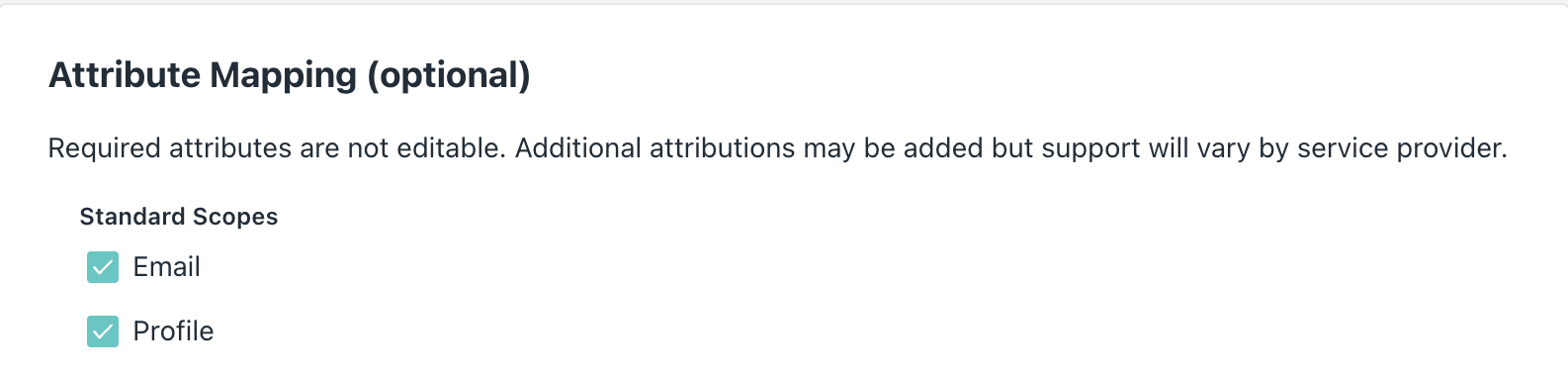
Under Attribute Mapping (optional), select both Email and Profile standard scopes
-
Copy the Client ID and Client Secret from JumpCloud
-
Open a new browser tab and go to your Webrix Admin Console at
https://app.webrix.ai/admin/settings -
Navigate to Settings → Authentication
-
Select Provider: JumpCloud from the dropdown
-
Enter the following values:
- Client ID: Paste the Client ID from step 6
- Client Secret: Paste the Client Secret from step 6
-
Click Save Changes
Your SSO configuration is now complete.
Assign users or groups
- Return to the JumpCloud Admin Console
- In the Webrix app, navigate to the User Groups tab
- Select the user groups who should have access to Webrix
- Click Save
SP-initiated SSO
Users can sign in to Webrix by starting from the Webrix dashboard:
- Navigate to your Webrix dashboard at
https://{your-webrix-org}.mcp-s.com - You'll be automatically redirected to JumpCloud to authenticate
- Enter your JumpCloud credentials (if not already signed in to JumpCloud)
- After successful authentication, you'll be redirected back to the Webrix dashboard
Configure SCIM provisioning
If you want to automatically provision and manage users from JumpCloud to Webrix, follow these steps:
Generate API token in Webrix
-
In your Webrix Admin Console, navigate to
https://app.webrix.ai/admin/api-tokens -
Click Generate Token
-
Enter a descriptive name for the token (for example, "JumpCloud SCIM")
-
Click Generate
-
Copy the API Token (it starts with
wxt_...)Important: Save this token securely. You won't be able to see it again.
Configure SCIM in JumpCloud
- Return to the JumpCloud Admin Console
- Navigate to the Webrix application you created earlier
- Click on the Identity Management tab
- Click Configure in the SCIM section
- Enter the following values:
- Base URL:
- For SaaS deployments:
https://app.webrix.ai/scim/v2 - For On-Premise deployments:
{your-app-url}/scim/v2
- For SaaS deployments:
- Token Key: Select API Token (Bearer)
- Token: Paste the API token from the previous step (starts with
wxt_...)
- Base URL:
- Click Test Connection to verify the connection
- Click Activate
Enable provisioning features
- After activation, you'll see the SCIM configuration options
- Enable the following features:
- Create users: Automatically create new users in Webrix when assigned in JumpCloud
- Update user attributes on changes: Sync user attribute changes from JumpCloud to Webrix
- Delete / Suspend users on removal: Automatically deactivate users in Webrix when unassigned in JumpCloud
- Enable group push: Sync group memberships from JumpCloud to Webrix
- Click Save
Configure attribute mapping
- In the Attribute Mapping section, ensure the following mappings are configured:
- userName → email
- name.givenName → firstname
- name.familyName → lastname
- emails[primary eq true].value → email
- active → suspended (inverted)
- Click Save
Your SCIM provisioning is now configured. New users assigned to the Webrix app in JumpCloud will be automatically created in Webrix, and changes to user attributes or group memberships will be synchronized automatically.
Contact support
If you continue to experience issues, contact Webrix support at [email protected] with the following information:
- Your JumpCloud organization domain
- The error message or behavior you're experiencing
- Screenshots of your configuration (with sensitive information redacted)